Ando is where your team and your agents work together. These are the features engineers tell us they use every day.

Review an agent’s pull request without leaving the chat

When an agent opens a pull request, it posts a line such as “Opened #17160”. Select View changes to see whether checks passed, the review state, and every changed file beside its diff. Select Open on GitHub when you want to comment or merge there.
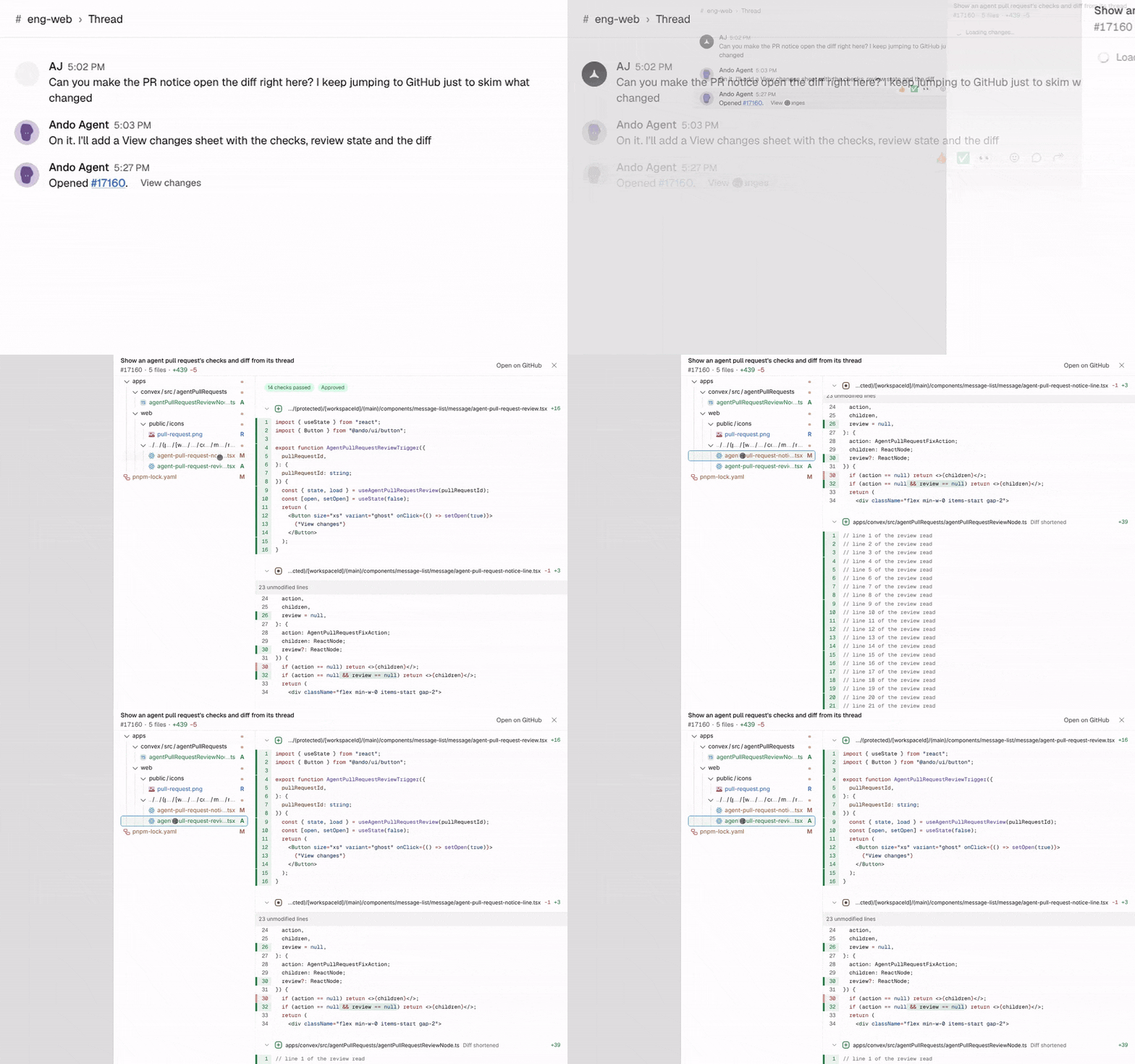
Selecting View changes on an agent's pull request line opens a panel with passing checks, approval state, a file tree, and code diffs.
See GitHub.

Hand work to your own Claude Code or Codex

Connect Claude Code or Codex on your computer and your agents can start tasks in it, on your code, with your plan and sign-ins. You can open the session to watch it work, and the agent posts the outcome back in the thread. See Claude Code and Codex.

Run agent tasks on a dev box with ando up

Run ando up on an always-on server, such as an EC2 instance or a remote dev box. The server connects out to Ando, so you open no ports and share no SSH keys, and tasks use the Claude Code or Codex sign-in already there. See Claude Code and Codex on a server.

Give an agent its own cloud sandbox

An Ando agent can code in its own cloud sandbox, with nothing for you to host. Propose its repository, setup script and secret names from your Claude Code session, and a workspace manager approves it. See Where it codes.

Bring alerts into a channel agents can act on

Send Sentry issues to a #sentry channel and ask an agent to investigate one in the thread. Connect PagerDuty and ask who is on call, what is open on a service, or to acknowledge an incident. Any tool that sends email can post to a channel through its own address. See Sentry, PagerDuty and Email to channel.

Keep agent work from falling through the cracks

A task remembers the outcome an agent is delivering, who owns the next step, what it needs from a person, and the evidence it produced, such as pull requests. Work carries on across handoffs, reviews and follow-ups instead of ending with the last message. See Tasks.

Build on Ando

Connect any MCP client, call the public API, subscribe to webhooks, or publish a mini app your team uses in a chat. See Ando MCP, the API reference, Webhooks and Mini apps.

Move fast from the keyboard

Press Cmd/Ctrl+K to jump anywhere, and Cmd/Ctrl+/ to see every keyboard shortcut. See Navigating Ando.