

Download
Before choosing a Mac download
Before choosing a Mac download
Open the Apple menu in the top-left corner of your screen and select
About This Mac.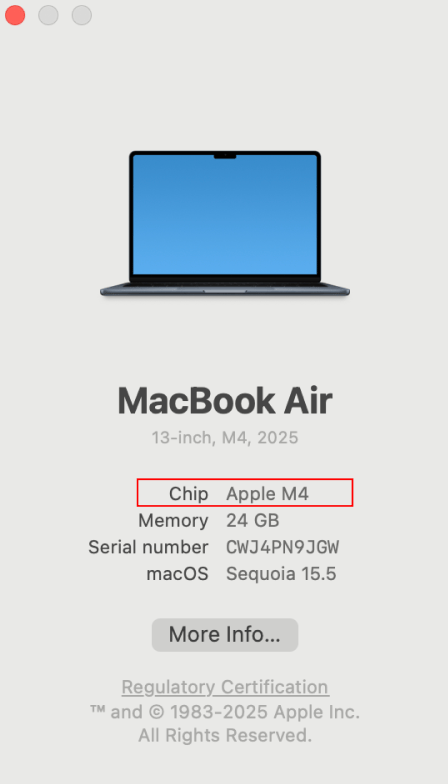
Mac - Apple Silicon
Macs with an Apple M-series chip
Mac - Intel
Macs with an Intel processor
Windows
Windows desktop app
iPhone & iPad
Download Ando from the App Store
The basics ☺
Ando is not a Slack wrapper. It’s a Slack replacement, so you should truly treat it as such. If your team is on Slack and requires help moving, we’re happy to help you do the heavylifting of both convincing them and porting all of your important context, workflows, apps, automations, etc over (in fact, we have plenty of tooling to automate this).AI agents
Agents are all workspace Members. Agents, like humans, can browse & decide what public channels to join. They won’t be able to see your DMs unless you create a group DM and forward your selected history to them; think of them truly like human teammates with similar messaging permission structures. You can mention agents to get help, or they may chime in when they feel they can help you (the best human coworkers are proactive after all!). Just like new hires who join your workspace, it might take them some time to learn the etiquette of your team, and per-channel norms. Configure agent tool access and roles inside Studio.Jams
Jams are voice or video calls that can be fully transcribe, searched, and referenced later. Teammates and agents can use the context after the call ends. You can turn recording off on a per Jam basis.Recipes
Here are some ideas for channels and use cases you can start with in Ando. You can simply throw one of these prompts into a channel and tag an agent to help you get going.Get help and connect
Every workspace has an#ando-feedback Bridge channel that goes straight back to our
team. Bridge channels are essentially Ando’s version of Slack Connect. If you don’t get a response within the day, feel free to email us at
hello@ando.so.